

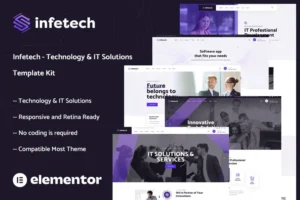
 Infetech - Technology & IT Solutions Elementor Template Kit
 TOP 1 HOSTING KHUYÊN DÙNG
Nếu Theme & Plugin chưa được cập nhật, vui lòng gửi yêu cầu cập nhật bản mới tại Fanpage Theme Tốt
Khuyến cáo: "Hãy tự bảo vệ website của bạn, bằng cách sử dụng Theme & Plugin sạch, rõ nguồn gốc... Nói không với theme miễn phí trôi nổi trên mạng, luôn tìm ẩn mã độc ăn cắp dữ liệu, ảnh hưởng thứ hạng SEO Web và người dùng của bạn!".
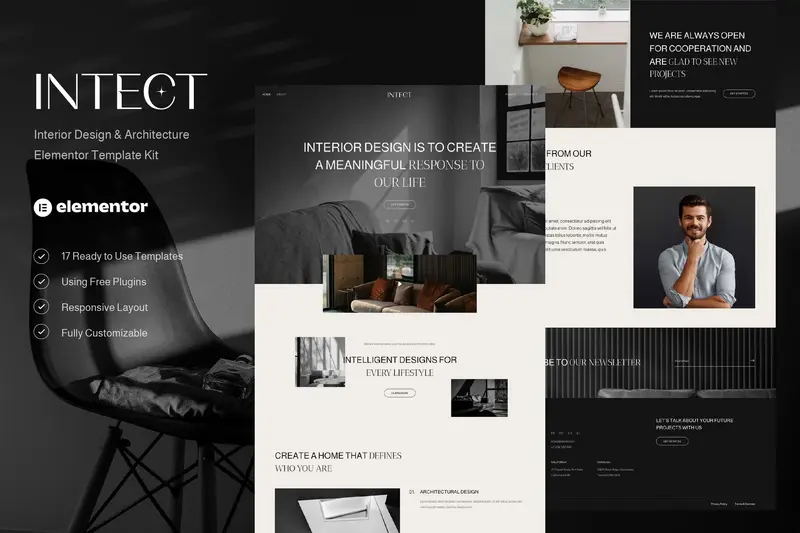
Intect – Interior Design & Architecture Elementor Template Kit
89.000₫
Quà tặng
Ưu Đãi Chỉ Có tại Theme Tốt
✓Hỗ trợ tư vấn Theme & Plugin miễn phí
✓Miễn phí cài đặt import Theme giống mẫu demo
✓Sử dụng không giới hạn Website, tên miền
✓Tặng 1 năm miễn phí cập nhật phiên bản mới
✓Tặng Khóa học SEO Website từ Cơ bản đến Nâng cao trị giá 899,000đ
✓Tặng 60 checklist tối ưu bài viết chuẩn SEO đầy đủ nhất 2025
✓Tặng +2000 prompt SEO, Socical, Ads dành cho chat GPT
✓Tặng khoá học Quảng Cáo Google Ads trị giá 2 triệu (khi mua Gói Update Lifetime)
✓Tặng plugin Elementor Pro trị giá $59 (khi mua Kho Giao Diện)
✓Tăng plugin Yoast SEO Premium hoặc Rank Math Pro (khi mua Kho Giao Diện)
✓Tặng plugin bảo mật iThemes Security Pro (khi mua Kho Giao Diện)
✓Miễn phí Thay logo, màu sắc chủ đạo, Hotline, Chat (khi mua Kho Giao Diện)
✓Hỗ trợ cài đặt và tối ưu Hosting (khi mua Kho Giao Diện)
✓Tặng hệ thống cập nhật Plugin tự động (Độc quyền Theme TỐT)
Thanh toán online - Tải sản phẩm trực tiếp từ website
- Mua 2 sản phẩm khác nhau giảm 10%.
- Mua 3 sản phẩm khác nhau giảm 15%.
- Mua 4 sản phẩm khác nhau giảm 20%.
- Mua 5 sản phẩm khác nhau trở lên giảm 30%
Truy cập hơn 5000 sản phẩm
- Tải xuống hầu hết THEME và PLUGIN WP.
- Không giới hạn số lượng website sử dụng.
- Cập nhật thường xuyên.
- Giá rẻ tiết kiệm tới 95%.
Hỗ trợ mọi lúc mọi nơi.
Để được hỗ trợ tốt nhất, vui lòng gửi email tới địa chỉ sau:
[email protected]
hoặc qua Zalo Theme Tốt
Chat hỗ trợ trực tuyến


TOP 2 HOSTING KHUYÊN DÙNG

TOP 3 HOSTING KHUYÊN DÙNG
Intect – Interior Design & Architecture Elementor Template Kit
Intect – Interior Design & Architecture Elementor Template Kit được thiết kế dành riêng cho các website ngành Nội thất, Kiến trúc, Bất động sản và Nội thất, cùng các lĩnh vực liên quan. Bộ Template Kit này có thiết kế đơn giản, hiện đại và sạch sẽ với giao diện hoàn toàn responsive, dễ dàng tùy chỉnh mà không cần phải biết về coding.
Bạn sẽ nhận được 13 trang và 17 Template được chăm chút kỹ lưỡng, giúp xây dựng website chuyên nghiệp chỉ trong vài cú click.
Nổi bật và Tính năng
- Sử dụng phiên bản Free của Elementor (không bắt buộc Elementor Pro)
- Thiết kế độc đáo & sạch sẽ, chuyên nghiệp
- 13 trang sẵn sàng sử dụng
- 17 Template hoàn chỉnh
- Giao diện hoàn toàn Responsive, chuẩn mọi thiết bị
- Dễ dàng tùy biến linh hoạt
- Tương thích đa trình duyệt: Chrome, Firefox, Safari, Opera
Danh sách Templates
- Global Theme Style
- Home
- About
- Services
- Service Detail
- Projects
- Project Detail
- FAQs
- Pricing
- Team
- Blog
- Single Post
- Contact
- 404 Page
- Header
- Footer
- Form Contact
- Form Newsletter
Plugin Yêu cầu
- Elementor
- ElementsKit Lite
- WPForms Lite
- Gum Elementor Addon
Hướng dẫn cài đặt
- Cài đặt và kích hoạt Plugin “Envato Elements” trong Plugins > Add New của WordPress
- Tải về file kit, không giải nén
- Vào Elements > Installed Kits, nhấn nút Upload Template Kit để tải lên. Hoặc kết nối tài khoản Elements để nhập mẫu tự động qua Elements > Template Kits
- Kiểm tra banner màu cam trên cùng và nhấn Install Requirements để cài các plugin cần thiết
- Nhấn Import trước cho Global Kit Styles
- Import từng Template một. Các template sẽ được lưu trong Elementor theo Templates > Saved Templates
- Tạo trang mới trong Pages và chọn Edit with Elementor
- Nhấn biểu tượng bánh răng dưới góc trái để chỉnh cài đặt, chọn Elementor Full Width và ẩn tiêu đề trang
- Nhấn biểu tượng thư mục màu xám chọn tab My Templates và import trang muốn chỉnh sửa
Cài đặt Global Header và Footer
- Import template header và footer đã có
- Vào ElementsKit > Header Footer, chọn Header và nhấn Add New
- Đặt tiêu đề, chọn Entire Site và bật kích hoạt (Activation On)
- Nhấn tiêu đề template để vào Edit Content
- Nhấn biểu tượng thư mục và chọn template header để nhập và Update
- Lặp lại tương tự với Footer
Lưu ý
Bạn cần tạo 3 menu Header cho Intect Elementor Template Kit:
- Header Left (menu bên trái)
- Header Right (menu bên phải)
- Mobile Header (menu cho thiết bị di động)
Bộ Template Kit này sử dụng hình ảnh demo từ Envato Elements. Bạn cần mua bản quyền hình ảnh từ Envato Elements hoặc thay thế bằng ảnh riêng của bạn.
Quà tặng
Trọn Bộ Quà Tặng Cao Cấp Độc Quyền Khi Mua
- Hỗ trợ tư vấn Theme & Plugin miễn phí
- Sử dụng không giới hạn Website, tên miền
- Miễn phí cài đặt import Theme giống mẫu demo
- Miễn phí thay logo, màu sắc chủ đạo, Hotline, Chat
- Giảm 100k mua lần đầu Kho Giao Diện - Nhập mã: THEMETOT100
- Tặng 1 năm cập nhật miễn phí phiên bản mới
- Tặng 60 checklist tối ưu bài viết chuẩn SEO đầy đủ nhất 2024
- Tặng Khóa học SEO Website từ Cơ bản đến Nâng cao – Trị giá 899,000đ
- Tặng Khóa học thiết kế Website bằng WordPress cơ bản – Trị giá 1,000,000đ
- Tặng Khóa học thiết kế Website WordPress Bán Hàng – Trị giá 2,500,000đ
- Tặng Khóa học Quảng Cáo Google Ads – Trị giá 2,000,000đ
- Tặng Solid Security Pro – Plugin bảo mật số 1 WordPress – Trị giá 5,000,000đ
- Tặng Yoast SEO Premium – Plugin SEO WordPress tốt nhất – Trị giá 2,500,000đ
- Tặng Rank Math PRO – Plugin SEO WordPress số 1 hiện nay- Trị giá 2,000,000đ
Hướng dẫn cài demo giống như mẫu, mua từ kho Giao Diện Tiếng việt.
Sau khi đã mua theme tiếng việt tại Theme TỐT, thường các theme sẽ được sao lưu và xuất ra từ 2 plugin đó là: Duplicator và All-in-One WP Migration.
Xem hướng dẫn bên dưới để có thể tự mình cài đặt demo giống như mẫu thành công.
Hướng dẫn cài demo với Duplicator
Hướng dẫn cài demo với All-in-One WP Migration
Trong quá trình cài đặt hoặc sử dụng cần sự trợ giúp, vui lòng xin liên hệ Theme TỐT.
Cảm ơn Quý khách đã tin tưởng sử dụng sản phẩm của Theme TỐT.
Member: 2207
- Trước khi mua hàng, vui lòng đọc Điều khoản sử dụng .
- Nếu bạn có bất kỳ câu hỏi nào, trước tiên hãy đọc Câu hỏi thường gặp .
- Tất cả sản phẩm các sản phẩm đều được miễn phí cập nhật trong vòng 1 năm kể từ ngày mua. Tuy nhiên, với các khách hàng mua gói thành viên Membership sẽ được cập nhật trong khoản thời gian tương úng của gói thành viên.
- Hướng dẫn cách cập nhật sản phẩm lên phiên bản mới
- Mỗi sản phẩm bạn có thể sử dụng cho không giới hạn website.
- Nếu bạn chưa tìm thấy câu trả lời cho câu hỏi của mình, vui lòng liên hệ với chúng tôi bằng email [email protected] hoặc Facebook, Zalo bên dưới.
- Bạn có thể tải xuống sản phẩm sau khi mua bằng liên kết trực tiếp trên Trang Tài khoản .

Hỏi đáp
Không có bình luận nào
Sản phẩm tương tự

89.000₫
Template Kits
89.000₫
Template Kits
89.000₫

89.000₫

89.000₫

89.000₫

89.000₫
Template Kits
89.000₫
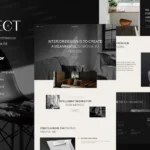
Intect – Interior Design & Architecture Elementor Template Kit
89,000đ
Nội dungIntect – Interior Design & Architecture Elementor Template KitNổi bật và Tính năngDanh sách TemplatesPlugin Yêu cầuHướng dẫn cài đặtCài đặt Global Header và FooterLưu ýIntect – Interior Design & Architecture Elementor Template Kit Intect – Interior Design & Architecture Elementor Template Kit được thiết kế dành riêng cho các website ngành Nội thất, …
(Mua hàng nhanh, thanh toán an toàn và nhận hàng sau 5 phút!)
Bạn phải đăng nhập để gửi yêu cầu.
Chỉ những khách hàng đã đăng nhập và đã mua sản phẩm này mới có thể để lại đánh giá.
Chưa có đánh giá nào.